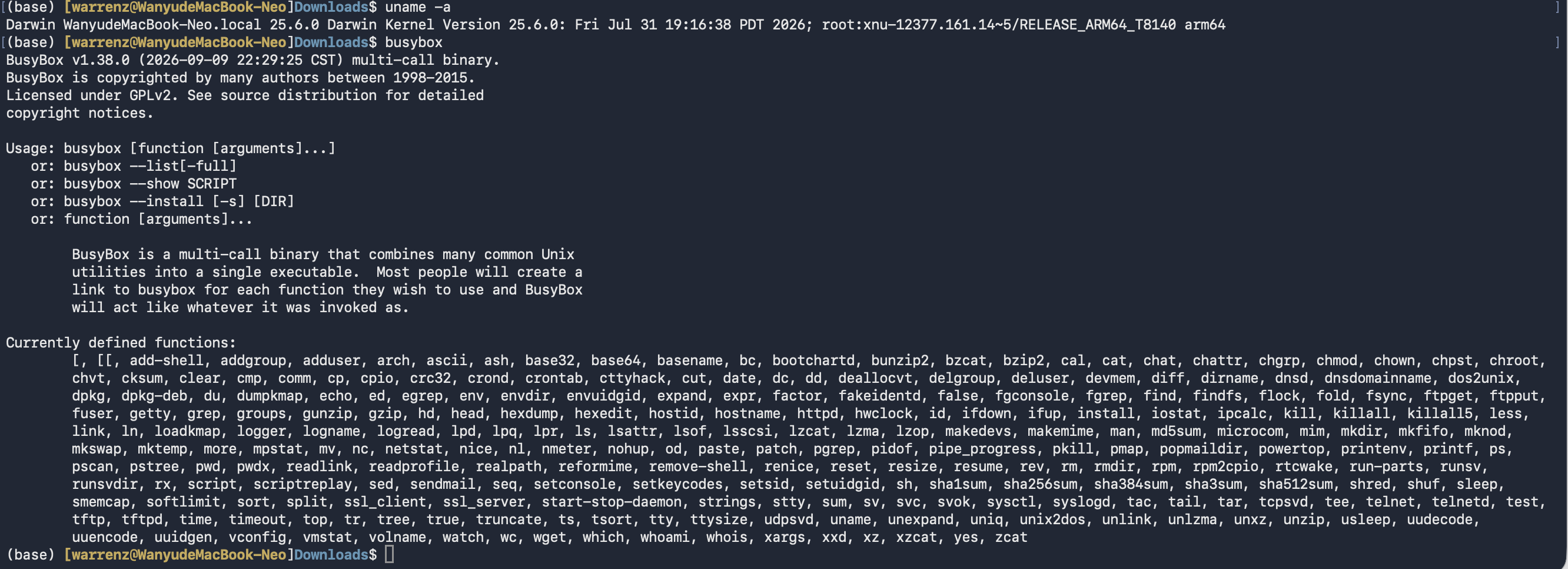
将BusyBox移植到macOS 26上
在Codex的帮助下,将BusyBox命令行工具移植到了MacBook上面。
代码已开源,见 cyclinbox/busybox-macOS26 。
背景
众所周知,BusyBox 是 Linux 上一个功能强大的命令行工具,包含 100 多个小程序。
macOS 是由苹果公司设计的一套系统,基于 Darwin 内核。Darwin 内核是一种类 BSD Unix,因此它与 Linux 共享部分系统调用和 API。
遗憾的是,目前没有适用于新 macOS(搭载 Apple Silicon)的 BusyBox 移植版本。存在一些名为”busybox-osx“或其他名称的项目,但这些项目都非常古老(有些几乎是十年前的!)且已不再维护。
所以我希望从源代码在 MacBook 上从头构建一个 BusyBox 二进制文件。
我所做的事情
- 源代码已从 BusyBox 官方网站下载: busybox.net
- 编译工具:Apple xcode-tools,包括 make、clang 和 ar。
- (注意:macOS 的
ar归档指令与 Linux 的ar指令行为不同,因此若在源代码上不加修改地直接运行make编译指令,将收到错误消息)
- (注意:macOS 的
此外还有一些补丁(感谢 Codex 的帮助!):
必要补丁
在 include/libbb.h 中:
第 143-149 行,添加一行:
1 |
|
在 include/platform.h :
第 169-201 行,添加若干行:
1 |
|
且在同一个文件中,第 528-534 行:
1 |
在文件 libbb/Kbuild.src
第 10-16 行,我们注释(禁用)了一行:
1 | # lib-y += alloc_affinity.o # Here is what we disabled. |
macOS 的 ar 命令的补丁
和Linux上的 ar 指令不同,在macOS上的ar指令(本质上是BSD unix的ar指令)不接受空文件输入。因此我们需要进行如下修改:
我们修改了 Makefile.flags 文件,以避免 macOS 的 ar 和 Linux 的 ar 之间的冲突
首先,我们通过在第 6-10 行禁用该标志来禁止调用 strip :
1 | SKIP_STRIP ?= y |
第 258-264 行,我们重新定义了函数 cmd_link_o_target
1 | cmd_link_o_target = $(if $(strip $(obj-y)),\ |
在第 271-279 行,我们重新定义了函数 cmd_link_l_target
1 | cmd_link_l_target = $(if $(strip $(lib-y)),\ |
编译的配置文件(.config)
由于 macOS 与 Linux 之间的系统差异,busybox 中的一些小程序无法编译。因此,我在 .config 文件中禁用了它们。
如果想要知道哪些功能被禁用,可以查看GitHub存储库根目录中的 .config 文件。
编译方法
目前我已经完成了编译前的配置过程,生成了编译指令所需的 .config 文件。因此,读者只需要将整个仓库下载到本地,然后运行 make 指令即可。
预编译的二进制文件&下载与安装
我在MacBook neo(A18pro, macOS 26)上完成了编译,编译好的可执行文件在仓库根目录中,文件名为 “busybox” 。下载它,通过 chmod +x busybox 授予可执行权限,然后直接运行就可以了。
BusyBox内置的这近百个小工具,很多是Linux上的常用工具,因此将其移植到macOS上,大大拓展了MacBook命令行环境下的软件生态(毕竟这里面很多小工具macOS上并没有,甚至使用homebrew都不一定能够安装到)
不过需要注意的是,这个可执行文件是针对Apple Silicon ARM 64架构编译的,在老版本Intel Soc的MacBook上无法直接运行(好在Intel版本的MacBook已经停产多年,现在大家的MacBook应该基本都是Apple Silicon的了)。